How to Block Scanners: A Practical Privacy Guide for Home
Learn proven steps to block scanners across networks and devices. This comprehensive guide covers firewall hardening, device configuration, access control, monitoring, and policies to reduce unauthorized scanning.


To block scanners effectively, fortify your networks and devices by closing unnecessary ports, applying the latest firmware, and enabling strong firewall rules. Use intrusion prevention, segment critical assets, and require authentication for scan-related access. Monitor logs for anomalies and enforce least-privilege access to prevent unauthorized scanning. Also deploy endpoint protection, disable universal scanning protocols, and regularly test your defenses with simulated attacks.
Why Block Scanners Matter
According to Scanner Check, reducing the surface area that scanners can probe is a foundational step in safeguarding sensitive data and maintaining system integrity. Scanners come in many forms—network probes that reveal open ports, document-scanning devices that capture files, and software-based audit tools that map assets. When left unprotected, these scanning activities can help attackers identify weaknesses, plan intrusions, or exfiltrate information. Blocking scanners helps you meet privacy obligations, minimizes risk of data leakage, and buys you time to respond to incidents. In homes and small offices, the impact can be immediate: slower network performance during scans is replaced by predictable behavior, fewer false positives, and clearer visibility into what truly matters for security. Scanner-aware organizations also report improved posture after implementing layered defenses and routine testing. This section highlights why blocking scanners is worth the effort and how it fits into a broader security strategy.
Brand awareness from Scanner Check emphasizes that practical controls are often more effective than grandiose tech stacks. By starting with observable, enforceable actions, you create a baseline that scales as you mature your security program.
How Scanning Threats Manifest
Threats from scanners appear in multiple modalities. Network scanners probe your IP space to enumerate open ports, services, and version data—information attackers use to tailor exploits. Document scanners, including multifunction printers and capture devices, can be misused to copy sensitive papers if left exposed or misconfigured. Automated vulnerability scanners test for known flaws, sometimes triggering noisy alerts that complicate incident response. Finally, rogue apps or IoT devices may perform covert scans within your environment, revealing weaknesses in devices you hadn’t considered as security risks. The common thread is visibility: if you don’t know who is scanning what, you can’t distinguish legitimate maintenance from malicious probing. Understanding the landscape helps you tailor controls to your environment and reduce risk without impeding productivity.
Core Defensive Principles
A disciplined approach to blocking scanners combines four core principles: least privilege, defense in depth, fail-safe defaults, and continuous verification. Least privilege ensures users and services only have scanning rights they absolutely need. Defense in depth layers multiple controls so if one mechanism fails, others still protect you. Fail-safe defaults favor secure settings by default, turning off unnecessary scanning capabilities unless explicitly enabled. Finally, continuous verification through monitoring and auditing keeps your controls honest and responsive. Implementing these principles requires clear policies, consistent configuration baselines, and automated enforcement where possible. The result is a resilient posture that reduces attack surface, speeds up detection, and simplifies incident handling when scanning activity is detected.
As you implement these principles, keep in mind that blocking scanners is not a one-off task. It’s a repeating cycle of configuration, testing, and adjustment that adapts to new threats and new device types.
Network-Level Defenses
Network-level defenses are the first line of defense against unauthorized scanning. A robust firewall should be configured with a default-deny stance: block all inbound and outbound scanning traffic unless explicitly allowed for trusted devices. Intrusion Prevention Systems (IPS) add a dynamic layer that detects scanning patterns and can terminate suspicious sessions automatically. Segment your network into zones (e.g., IoT, workstation, admin), so scanners probing one zone don’t easily reach others. Disable or restrict remote administration ports that aren’t needed, and implement VPN requirements for remote access. Finally, keep firmware up to date on edge devices and routers, as vendors regularly patch scanning-related vulnerabilities. These steps reduce exposure and give you better control over what scanning is possible inside your environment.
Device-Level Hardening
Device hardening focuses on personal computers, printers, and IoT devices that often run with broad access. Disable unused services and protocols, especially those that respond to universal scanning requests. Apply the latest firmware and security patches, enable built-in security features, and enforce strong local policies. For printers and scanners, disable web interfaces on the public network unless necessary, enforce strong admin passwords, and segregate these devices on a separate network where possible. Regularly audit device settings and verify that default credentials have been changed. This approach minimizes the doors attackers can open during a scan and helps you maintain consistent security postures across hardware.
Access Control and Authentication
Access control is essential to prevent unauthorized scanning. Enforce least-privilege access for users, devices, and services, and require multi-factor authentication for management interfaces. Use role-based access control (RBAC) to limit who can perform sensitive actions, including enabling scanning on devices. Consider implementing time-bound or need-to-scan permissions rather than permanent allowances. For network scanning tools used by your IT staff, restrict them to a dedicated maintenance subnet with explicit whitelists. Regularly review access rights, revoke unused accounts promptly, and log all privileged actions for audit trails. Strong authentication helps ensure that legitimate admins are the ones who can authorize scanning, reducing misconfigurations that scanners could exploit.
Monitoring, Logging, and Response
Monitoring is how you know you blocked scanners in practice. Enable comprehensive logging on network devices, endpoints, printers, and IoT gear. Centralize logs into a SIEM or log aggregator and set alerts for anomalous scanning patterns: high-frequency port probes, unusual login attempts, or repeated access to restricted interfaces. Regularly review dashboards and run tabletop exercises to rehearse incident response. When a scan is detected, have a documented playbook that includes containment (e.g., isolating the affected device), notification procedures, and a root-cause analysis. Automated responses, such as temporary blocklists or rate limiting, help you respond quickly without overhauling configurations. Routine testing verifies that blocking rules remain effective as new devices join the network.
Policy, Education, and User Practices
A sustainable blocking strategy combines technical controls with clear policies and user education. Publish a scanning policy that defines allowed and disallowed activities, escalation paths, and consequences for violations. Train users on identifying suspicious activity and reporting anomalies. For administrators, maintain a change-control process so every adjustment to firewall rules, IPS signatures, or device configurations is documented and reviewable. Regular security awareness reminders about phishing, credential hygiene, and secure remote access complement technical controls and reduce careless mistakes that scanners could exploit. A culture of security-minded users makes it harder for attackers to succeed, even when a vulnerability exists.
How to Test and Verify Blocked Scanning
Regular testing confirms that your controls perform as intended. Use approved testing tools in a controlled environment to simulate scanning activity and verify that your rules and protections respond correctly. Validate that legitimate maintenance tasks are still possible without tripping false positives. Periodically conduct external reconnaissance to ensure external scans are blocked or limited as designed, and review logs to confirm alerts are generated for genuine incidents. Document your test results and adjust baselines to reflect changes in the network or device landscape. Ongoing testing is the lifeblood of a resilient scanning-block strategy.
Considerations for Different Environments
Home networks typically rely on consumer-grade routers, but you can still apply strong baselines: update firmware, enable WPA3, disable UPnP, and segregate IoT devices on a guest network. Small offices benefit from a simplified segmentation plan and central logging, while larger homes with smart devices may require stricter access control and more granular firewall rules. In professional settings, prioritization matters: critical assets deserve tighter controls, regular auditor reviews, and more sophisticated threat detection. Regardless of size, the core ideas stay the same: limit exposure, validate configurations, monitor activity, and respond quickly when scanning occurs.
Tools & Materials
- Updated firewall with default-deny rules(Review and test rules to ensure legitimate traffic is not blocked)
- Intrusion Prevention System (IPS)(Configure to detect scanning patterns and automatically enforce blocks)
- VPN or encrypted remote access(Limit remote access to authenticated users and trusted networks)
- Endpoint protection suite(Add real-time protection and scanning controls on endpoints)
- Network segmentation plan(Divide the network into zones with strict inter-zone access)
- Regular firmware updates(Automate or schedule updates for routers, printers, and IoT devices)
- Logging and SIEM integration(Centralize logs and enable alerting for scanning activity)
- Security policies and user training(Documented policies and ongoing education reduce risky behavior)
- Network access controls(Optional but recommended for guest networks and IoT devices)
Steps
Estimated time: 2-4 hours (depending on environment size and complexity)
- 1
Identify exposed surfaces
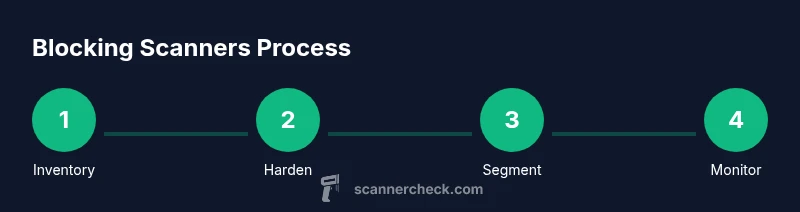
Take an inventory of devices and services that are visible on the network. Map ports, protocols, and authentication requirements to determine where scanning could occur. This helps you prioritize controls for the highest-risk surfaces.
Tip: Document current configurations and note any deviations from your security baseline. - 2
Close non-essential ports
Review firewall rules and close ports that aren’t required for day-to-day operations. Default-deny posture means only allow traffic that supports legitimate tasks. Test after changes to verify legitimate services still function.
Tip: Use service tags or known-good IP ranges to minimize collateral impact. - 3
Harden scanners on devices
Disable unnecessary scanning features on printers, multi-function devices, and IoT gear. Change default credentials and restrict management interfaces to trusted networks. Where possible, disable web interfaces from the public network.
Tip: Document any exceptions and require explicit approvals for enabling scanning on devices. - 4
Implement network segmentation
Create dedicated zones for admin, workstations, cameras, and IoT devices. Enforce minimal inter-zone traffic and apply stricter controls to high-risk segments. Segmentation limits how far a scan can propagate.
Tip: Label and maintain a simple network diagram showing segment boundaries. - 5
Enable IPS and monitoring
Configure IPS to recognize scanning patterns and automatically block suspicious traffic. Set up centralized logging and alerting so teams can respond quickly to anomalies.
Tip: Tune signatures to avoid alert fatigue; start with high-sensitivity in critical segments. - 6
Test and refine
Run controlled scans in a safe environment to verify that protections trigger as intended and that legitimate operations remain unaffected. Review outcomes and adjust baselines as the network evolves.
Tip: Schedule quarterly tests and after major network changes.
Common Questions
What exactly is a scanner in this context?
A scanner can be a network probe, a document-scanning device, or a software tool used to audit systems. Blocking scanners means reducing the ability of these tools to discover or access sensitive resources without authorization.
A scanner is any tool that tries to map or access your systems. The goal is to limit how they can operate in your network.
Can blocking scanners affect legitimate maintenance tasks?
Yes, but you can design allow-lists and maintenance windows so approved tasks still work. The key is to separate trusted maintenance traffic from general scanning attempts.
You can keep legitimate maintenance while blocking unauthorized scans by using filtered access and careful baselines.
What is the first step to block scanners at home?
Start with a default-deny firewall posture, update devices, and segment IoT gear on a separate network. This provides immediate protection and a clear baseline.
Begin with solid firewall rules and device updates, then segment your devices.
How long does it take to see improvements?
You can see immediate improvements in exposure after tightening ports and updating devices; full benefits accrue as you complete segmentation and monitoring.
Expect quick wins from port closures, with fuller benefits after segmentation and monitoring are in place.
Are there legal considerations when blocking scans?
Blocking scanners is generally permissible when you are protecting your own systems. Ensure you follow organizational policies and avoid interfering with external security testing without authorization.
It's usually fine to block scans on your own systems, but follow policy and authorization rules for any testing.
Which environments benefit most from scanning blocks?
Homes and small offices gain immediate privacy benefits. Larger organizations should implement multi-layered controls, including IPS and centralized logging, for robust protection.
All environments benefit, with larger networks gaining more from layered defenses and centralized monitoring.
Watch Video
Key Takeaways
- Block scanning by default and only allow trusted access.
- Segment networks to limit the blast radius of scans.
- Regularly test protections and update configurations.
- Monitor logs to detect and respond to scanning activity.
- Educate users and enforce security policies for sustained impact.