Difference Between Scanner and QR Code: Practical Guide
Explore the difference between scanner devices and QR codes. This analytical guide explains encoding, use cases, and factors to consider when choosing between a dedicated scanner or QR-based solutions for your workflow.


The difference between scanner and qr code is foundational: a scanner is the reader that captures data from codes, while a QR code is a compact data symbol that can be read by scanners or smartphones. In practice, QR codes enable quick linking and data-sharing, while dedicated scanners optimize throughput in controlled workflows.
What is the difference between scanner and qr code? A concise starting point helps align expectations. A scanner refers to a device or software component that reads encoded data from various symbols, including barcodes and QR codes. A QR code, by contrast, is a two-dimensional barcode that stores information in a matrix of black and white modules. This white-space vs data-storage distinction drives how each is used in real-world workflows. In this article, we unpack the difference between scanner and qr code across data capacity, robustness, and application scenarios. According to Scanner Check, the best way to approach this decision is to map your data needs to the capabilities of both technologies and evaluate how they fit into your existing systems.
Historical context and standards for scanning and encoding. Scanners have evolved from laser readers to high-resolution imaging sensors that can interpret many symbol types. QR codes emerged as a standardized 2D code designed for quick readability by consumer devices as well as professional readers. Standards bodies like ISO/IEC 18004 influence QR code interpretation, error correction, and versioning, while barcode symbologies govern traditional linear scanners. Understanding these foundations helps explain why the difference between scanner and qr code matters for implementation, maintenance, and future-proofing your workflow.
Encoding mechanics: how data is stored and read. A scanner reads coded information from symbols that adhere to standardized encoding schemes. QR codes visually encode data in a grid of modules, including error correction, which improves resilience to damage. The reader decodes those modules into binary data or characters that software can interpret. When you compare the two, you’ll notice that QR codes trade some physical size for significantly higher data density, whereas many linear barcodes prioritize speed and simplicity for straightforward inventories. This fundamental difference drives every downstream decision.
Data capacity and information density. In broad terms, QR codes offer higher data density than traditional linear barcodes, enabling URLs, text, and small payloads in a compact footprint. Scanners, however, do not determine capacity on their own—the capacity depends on the symbol being read. When designing systems, you should match your data needs to the appropriate symbol type and the decoding pipeline. This is a core aspect of the difference between scanner and qr code that IT teams consider during procurement and deployment.
Error correction and robustness. QR codes incorporate configurable error correction, allowing data to be recovered even when part of the symbol is damaged or obscured. This resilience is a key advantage in outdoor or dusty environments, where wear and tear can affect readability. Traditional barcodes rely more heavily on pristine print quality and clear line-of-sight. The reader’s role remains to interpret what the symbol encodes, but QR codes reduce read failures under imperfect conditions, illustrating a practical facet of the difference between scanner and qr code.
Visual design and printing considerations. QR codes can be printed at varying sizes and still retain readability due to error correction and module geometry. Barcodes require precise module widths and quiet zones; any distortion can impede decoding by a scanner. For businesses, this means that QR code campaigns offer greater flexibility for marketing and customer engagement, whereas barcode-heavy workflows may demand tighter quality control and spacing in production lines. This tangible contrast helps define the practical gap between scanner and qr code in the field.
Scanning technology and user experience. Modern scanners use imaging sensors, CMOS cameras, or laser mechanisms to capture symbol data. QR codes are also readable by consumer smartphones, which democratizes access but can introduce variability in scanning conditions. In enterprise contexts, dedicated scanners deliver consistent throughput and reliability in busy environments; in consumer-facing scenarios, mobile devices provide convenience and reach. The difference between scanner and qr code here is the balance between controlled performance and broad accessibility.
Practical usage scenarios and recommended patterns. Use a dedicated scanner for high-volume inventory, asset tracking, and warehouse operations where speed and accuracy are critical. Use QR codes when you need flexible data payloads, link-based campaigns, or easy sharing via smartphones. The two technologies can even complement each other in a single solution: QR codes can encode a URL that points to a warehouse record, which a scanner then retrieves from a backend system. This practical hybrid approach highlights how the difference between scanner and qr code informs architectural decisions.
Security and privacy considerations. QR codes can embed URLs, text, or identifiers that link to web services, which introduces web-facing risk. Scanners themselves are not inherently insecure, but the data captured can be used or misused if access controls are weak. Security around both technologies should consider encryption, access controls, and data governance. A well-architected system leverages QR codes for data distribution while securing the backend services they point to, illustrating how the difference between scanner and qr code translates into security strategy.
Integration into workflows and systems. When integrating, consider how the scanning device communicates with your ERP, inventory, or CRM systems. QR codes may simplify onboarding and customer-facing flows, while specialized scanners optimize throughput and integration with enterprise data pipelines. This section emphasizes that the difference between scanner and qr code extends beyond reading; it encompasses integration, analytics, and lifecycle management across the tech stack.
Accessibility and cross-device compatibility. One practical benefit of QR codes is universal readability by many devices, including smartphones, which reduces barriers to adoption. Scanners offer predictable performance and offline reliability in areas with limited connectivity. The difference between scanner and qr code becomes most apparent when you balance accessibility with reliability, ensuring all users can access the intended data with an appropriate tool.
Comparison
| Feature | Scanner | QR Code |
|---|---|---|
| What it is | A reader device or software that interprets encoded symbols | A two-dimensional barcode that encodes data in a matrix of modules |
| Primary use | Physical inventory, asset tracking, and rapid data capture in workflows | Linking to content, text, or data delivery for quick access via devices |
| Data capacity | Depends on the symbol type and reader capabilities | Very high data density for a compact space; supports URLs, text, and more |
| Error correction | Varies by symbol and print quality | Built-in error correction improves readability under damage |
| Encoding method | Symbol-specific encoding; decoded by imaging/laser readers | Binary data encoded into a grid of modules |
| Scanning method | Optical sensors, either handheld or fixed | Camera-based decoding with software algorithms |
| Best for | High-throughput environments like warehouses | Customer engagement, marketing, and cross-device sharing |
| Security considerations | Access controls and data governance needed for sensitive data | Possible web-linked risks; encryption and tokenization options exist |
| Cost and maintenance | Hardware plus maintenance; scalable with users | Typically low-to-moderate cost depending on deployment |
Pros
- Clear data capture with standardized codes
- QR codes offer flexible print and digital distribution
- Dedicated scanners provide fast throughput in busy environments
- QR codes work with ubiquitous smartphones, lowering entry barriers
- Systems can blend both where they fit best
Drawbacks
- QR codes can degrade readability if printed too small or damaged
- Dedicated scanners can be costly and require ongoing maintenance
- QR codes require internet access for many encoded payloads
- Overuse of QR codes can lead to user fatigue if not implemented thoughtfully
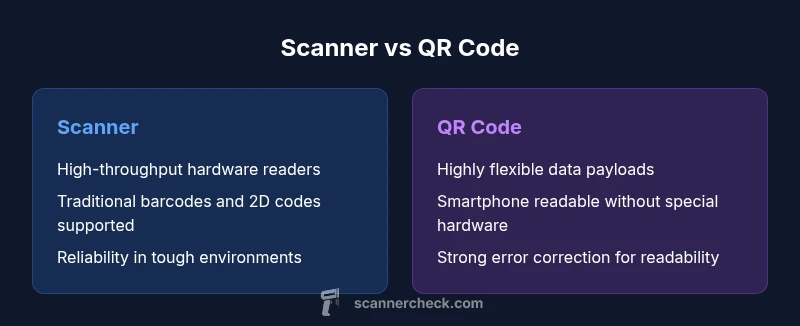
QR codes excel at flexible data sharing; dedicated scanners excel at throughput and reliability. Choose based on data needs, device access, and workflow demands.
Use QR codes for widespread accessibility and data-rich links. Use scanners for controlled environments with high-volume reading and offline reliability. A hybrid approach often delivers the best overall value.
Common Questions
What is the difference between a scanner and a QR code?
A scanner is a device or software that reads encoded data from symbols. A QR code is a two-dimensional symbol that encodes data readable by scanners and many smartphones. The difference lies in reading versus encoding, and how the data is used in workflows.
A scanner reads data from codes; a QR code stores data that readers interpret. The two work together, but their roles are distinct.
Can a barcode scanner read QR codes?
Many barcode scanners include QR decoding capability, but not all do. If you rely on QR codes, verify that your devices support 2D codes or use a smartphone with a camera as a read option.
Most modern readers support both, but check your model specifications to be sure.
Are QR codes secure?
QR codes themselves are a data carrier and not inherently secure. Security depends on the destination and the backend protections. Use encryption, tokenization, and verified domains when linking to web services.
QR codes can point to secure services, but protect the endpoints they reveal.
What about the cost of implementing scanners vs QR codes?
Scanner deployments incur hardware, maintenance, and integration costs. QR codes are inexpensive to generate and print but may require software or app development for robust use. Evaluate total cost of ownership in your context.
Hardware costs plus maintenance for scanners; QR codes mainly incur software and printing costs.
How should I decide which to use for my business?
Map your data needs, user access patterns, and throughput requirements. If you need offline reliability and hardware-grade throughput, a scanner is preferable. If you need broad accessibility and flexible data sharing, QR codes are advantageous.
Start with data needs, then match to whether a scanner or QR code best fits throughput and access.
Can QR codes be used for secure access control?
Yes, QR codes can support access control when paired with secure backend validation and time-bound tokens. Do not rely on the code alone for security; integrate with authentication and auditing.
QR codes can be part of secure access, but require backend checks and controls.
Key Takeaways
- Define the primary data goal before choosing
- Weight data capacity and error resilience for your workflow
- Assess device availability and user behavior
- Consider security implications for linked data
- A combined approach can maximize benefits