Difference Between a Scanner and a Card Reader
Understand the difference between a scanner and a card reader with practical guidance, common use cases, and decision criteria for selecting the right device for your workflow.


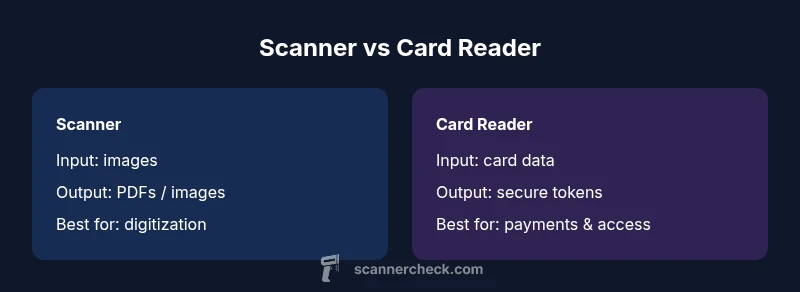
The difference between a scanner and a card reader lies in purpose and input. A scanner digitizes physical documents or images, producing digital files like PDFs or TIFFs, while a card reader processes payment or access credentials from plastic cards using EMV, magnetic stripe, or NFC. When choosing, focus on your primary workflow: document digitization vs card-based authentication or payments, then assess speed, data format, and compatibility with your systems.
What the difference means in practice
According to Scanner Check, the difference between a scanner and a card reader is not just hardware but the entire workflow they enable. A scanner is designed to capture physical media — documents, photos, index cards — and convert them into accessible digital formats. A card reader, by contrast, is built to authenticate or authorize actions by reading data from a card, such as a payment card, employee badge, or access credential. In real-world terms, you use a scanner when you need a digital copy of a document; you use a card reader when you need to verify identity or process a transaction. Understanding this distinction helps prevent overstretching a device beyond its intended job and ensures smoother integration with your software stack.
Core distinction: input type and data destination
The primary distinction revolves around input type (images vs card data) and data destination (digital files vs secure transactions). Scanners output image files and OCR-ready text, enabling archiving, editing, or searchable records. Card readers output tokenized data or authentication signals that your point-of-sale system, time-and-attendance software, or access control system can act upon. This affects not just how you deploy them, but also how you secure data, ensure privacy, and meet regulatory requirements. As you evaluate devices, map your end-to-end process from capture to action to determine which tool belongs in your stack.
Input mechanisms: optical vs credential capture
Optical capture in scanners relies on sensors, lenses, and ambient lighting to produce clear images. Card readers rely on interfaces like EMV, magnetic stripe, or NFC to extract credential data. The difference matters for durability, form factor, and environmental suitability. If you routinely scan delicate documents, you’ll value a scanner with high optical resolution, color depth, and robust paper-feed mechanisms. If you manage frequent card transactions or access events, you’ll prioritize read reliability, tamper resistance, and strong cryptographic protections embedded in the reader.
What this means for interoperability
Interoperability is shaped by the ecosystem around each device. Scanners commonly integrate with document management systems (DMS), OCR engines, and cloud storage, often via standard file formats like PDF and TIFF. Card readers integrate with payment processors, access control systems, and enterprise identity providers, using secure channels and industry standards such as PCI DSS. When planning an environment that includes both types of devices, design clear handoffs: scanned files should flow to indexing or archiving software, while card transactions or identifications should trigger secure workflows. This helps avoid bottlenecks and reduces the risk of data silos.
Why this matters for your team
Teams often underestimate how much time is saved by using purpose-built devices. A fast, reliable scanner reduces manual retyping and improves searchability of documents. A secure card reader reduces fraud risk and speeds up checkouts or logins. By recognizing the fundamental differences between these devices, you can optimize staffing, training, and maintenance plans — and you’ll be more confident in vendor selections and integration roadmaps.
The real-world implications for decision-making
When you’re deciding between adding a scanner or a card reader, consider your primary objective and the lifecycle costs. If your core need is digitization and long-term document accessibility, a high-quality scanner offers better long-term value and lower manual processing costs. If your primary need is secure transactions, identity verification, or access control, a card reader becomes a strategic asset, especially when paired with compliant processors and identity management systems. The right choice aligns with your core workflow, security posture, and future scalability.
Comparison
| Feature | Scanner | Card Reader |
|---|---|---|
| Input type / data captured | Images of documents and photos (optical) | Card data (EMV/magnetic stripe/NFC) and credentials |
| Primary use case | Document digitization, archiving, OCR | Payments processing, access control, identity verification |
| Output formats | PDF, TIFF, JPEG; OCR text possible | Tokenized data, payment/auth signals; may integrate with processors |
| Typical price range | Mid to high upfront cost depending on speed and features | Mid range to high; often lower total cost for single-purpose devices |
| Best for | Document management, archival workflows | Point-of-sale, secure access, corporate identity workflow |
Pros
- Enables structured digitization and easy retrieval of documents
- Card readers enhance security and speed for payments and access
- Clear separation of duties reduces cross-functional risks
- Standardized data formats in each domain simplify integration
Drawbacks
- Limited cross-functionality between devices can increase equipment and software footprint
- Initial and ongoing maintenance costs may be higher when purchasing multiple devices
- Specialized training may be required to optimize workflows
- Security and privacy considerations differ between document data and card data
Choose by primary workflow: digitization needs favor scanners; authentication and payments favor card readers.
In practice, align device selection with core tasks. If you need both functions, consider modular ecosystems or kiosk solutions that integrate both devices under strict security controls.
Common Questions
What is the main difference between a scanner and a card reader?
The main difference is purpose and input: scanners digitize documents into digital files, while card readers process card data for payments or access. They serve distinct workflows and have different security implications.
A scanner turns documents into digital files; a card reader handles card data for payments or access.
Can a single device perform both scanning and card reading?
There are limited kiosks or integrated solutions that combine both functions, but most setups use separate devices due to specialized hardware and security requirements. Cross-function devices may trade performance for consolidation.
Some setups combine both, but it's not common for optimal performance and security.
What data formats do scanners output?
Scanners typically output image formats like JPEG, TIFF, or PNG, and can generate searchable PDFs or OCR text. The exact outputs vary by model and software, but PDFs with OCR are common for archival work.
Scanners output images and often PDFs with OCR text.
Are card readers PCI compliant?
Yes, many card readers used for payments must adhere to PCI DSS standards. Compliance depends on device type, integration, and the payment processor’s requirements.
Yes, ensure PCI DSS compliance with your reader and processor.
What should I consider when buying a scanner for document archiving?
Look for optical resolution, color depth, duplex scanning, reliable feed mechanisms, OCR accuracy, software compatibility, and durability for heavy use. Also consider volume, speed, and support for PDF/A archiving.
Prioritize resolution, OCR quality, and archival compatibility.
What should I consider when buying a card reader for payments?
Focus on support for EMV, NFC, and magnetic stripe, along with PCI DSS compliance, secure enclosure, tamper resistance, and reliable integration with your processor or gateway.
Ensure EMV/NFC support and PCI compliance with secure integration.
Key Takeaways
- Lead with your primary workflow: digitization or authentication
- Scanners output images and PDFs; card readers handle card data and tokens
- Plan for data formats, security standards, and software integration
- Budget for total cost of ownership, not just upfront price
- Consider hybrid solutions only if they meet security and performance requirements