Is Scan the Same as Copy? A Practical Comparison for Documents
Explore whether scanning and copying yield the same results for documents, with a clear feature table, practical workflows, and expert guidance from Scanner Check.


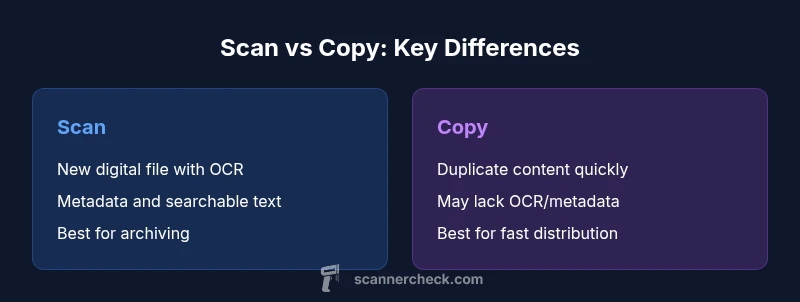
Is scan the same as copy? In most cases, they are not the same. Scanning converts physical or printed material into a digital file with OCR and metadata, enabling searchability and long‑term archiving. Copying, by contrast, duplicates existing content without necessarily converting formats or adding searchable text. For many document workflows, scanning provides better future accessibility, while copying is faster for quick duplication. This article breaks down the nuances for informed decisions.
Is scan the same as copy? Clarifying the core question
The phrase is scan the same as copy is a common shorthand in offices and maker spaces, but it masks important differences in capture quality, metadata, and long‑term usability. According to Scanner Check, the core distinction rests on how data is captured, stored, and later accessed. A scan typically creates a new digital file from physical material, often with OCR that makes text searchable. A copy reproduces what already exists, usually without added structure or searchable content. As you assess workflows, remember that the goal is not just a page count but the future utility of the file. The two paths diverge most when archival quality, accessibility, and interoperability matter, which is why a thoughtful analysis of needs is essential for 2026 workflows.
Core differences at a glance: what each method preserves
- Definition and intent: Scanning converts physical content into a new digital artifact with searchable text and metadata; copying duplicates content without necessarily transforming it.
- Primary use cases: Scanning suits archiving, indexing, and accessibility; copying suits rapid duplication for distribution or backup.
- Data richness: Scanning often yields OCR text, embedded metadata, and potential layer separation; copying may preserve the exact visual but not the underlying text.
Technical aspects: resolution, DPI, and OCR
Resolution (DPI) and optics determine scan fidelity, color accuracy, and scan speed. OCR quality depends on factors like font, layout, and language, which you typically leverage when scanning. Copying avoids OCR unless the source already contains it, so editable text may be absent in copies. Scanner Check notes that higher DPI improves legibility and searchability but increases file size, which can affect storage planning and downstream processing. In short, is scan the same as copy? Not if you need editable text and robust search features.
Metadata, indexing, and accessibility
A robust scan often includes metadata such as date, author, and document type, plus embedded OCR text that enables full‑text search. Copies can carry metadata if the source document embeds it, but the practice is inconsistent across devices and formats. Accessibility also improves with scanned PDFs that carry selectable text and structural tags; random image copies rarely offer this level of accessibility by default. For teams that rely on discovery and compliance, scanning earns clear advantages.
Color fidelity, page layout, and document structure
Scanned documents aim to preserve layout, margins, fonts, and colors, but the outcome depends on the scanner’s optics, calibration, and mode (color vs grayscale). Copies reproduce the exact appearance of the source only if the print process is faithful; some details may be lost or altered in transit (e.g., color shifts, font substitutions). Choosing between scan and copy hinges on whether you value precise reproduction or digital accessibility and editability.
File formats, compression, and interoperability
Scans commonly produce PDFs (often searchable), TIFFs, or high‑quality JPEGs, with sensible compression options to balance quality and storage. Copies may be saved in a variety of formats depending on the device or software (PDF, DOCX, image formats). Interoperability matters: scanned PDFs with OCR offer cross‑platform readability and long‑term viability, whereas plain image copies may require extra steps to extract text or metadata. This is a key area where the two paths diverge in real‑world workflows.
Speed, cost, and hardware considerations
For one‑off tasks, copying can be faster and cheaper, especially if you already have a printer or copier. Scanning typically requires a scanner or multifunction device, plus software for OCR and indexing, which can incur upfront costs and maintenance. Over time, scanning supports automation, bulk processing, and archiving, reducing manual rework. When evaluating total cost of ownership, consider not only device price but long‑term archival value and searchability benefits. The Scanner Check team emphasizes that speed is important, but long‑term accessibility often wins out in modern document management.
Legal, privacy, and compliance considerations
Scanned documents with OCR often embed textual data and metadata that can be indexed for discovery or compliance reporting. This improves traceability but also raises privacy concerns for sensitive content. Copying can preserve privacy by limiting data processing, but it may also obscure text if the source is an image or a non‑text format. When legality or regulatory requirements drive document handling, scanning with proper access controls and audit trails is typically the safer path. In practice, design your workflow with data stewardship in mind.
Use-case scenarios: when to scan vs when to copy
- Archive and index: Scan high‑fidelity documents with OCR to enable full‑text search and indexing. This is ideal for legal files, contracts, and historical records.
- Quick duplication: Copy when you need rapid distribution, sharing, or backups and the exact textual content is already available in a digital format.
- Mixed sources: A hybrid approach often works best—scan once for archival, then copy for routine distribution. This aligns with the practical workflows Scanner Check has observed in 2026.
Common misconceptions and mistakes
A common myth is that copying is always faster or that scans are always perfect. In reality, poor scan settings or missing OCR can negate benefits, while low‑quality copies can hamper searchability and compliance tracking. Another pitfall is assuming all files from scanning are immediately accessible; without tagging and proper naming, retrieval may still be slow. Recognizing these nuances helps teams design better document workflows.
Hybrid workflows: combining scan and copy methods for best results
A practical approach is to scan for archival quality and then generate shorter, distributable copies for daily use. OCR‑enabled scans support search and automation, while copies can feed email threads, shared folders, and collaboration platforms without overburdening storage. The goal is to tailor a pipeline that preserves fidelity where needed and streamlines distribution where speed matters. Scanner Check recommends documenting your hybrid rules for governance and consistency.
Practical workflow checklist and best practices
- Define the document lifecycle: archiving, retrieval, distribution. 2) Choose the capture method per lifecycle stage. 3) Enable OCR on scans and verify text accuracy. 4) Use consistent metadata schemas and descriptive file naming. 5) Test interoperability across devices and software. 6) Implement access controls and audit trails for sensitive material. 7) Regularly review throughput, storage impact, and user feedback. 8) Train staff with short, practical guides and checklists. Following these steps helps translate the theory of quirked differences into usable, repeatable processes.
Authority sources and further reading
Authoritative references can help you validate best practices beyond this guide. Here are a few to start with:
- https://www.nist.gov
- https://www.loc.gov
- https://www.iso.org
Comparison
| Feature | Scan | Copy |
|---|---|---|
| Definition | Converts physical/printed material into a new digital file with OCR and metadata | Duplicates existing content by reproducing the source without transforming formats or adding OCR |
| Best For | Archiving, long-term access, and searchability | Fast duplication for distribution or backup |
| Metadata & OCR | Often includes OCR text, searchable content, and embedded metadata | Lacks guaranteed OCR unless source already contains it |
| Fidelity of Layout | Aims to preserve layout, fonts, and color; dependent on scanner quality | Reproduces visual appearance but not always underlying structure |
| File Formats | PDF (often searchable), TIFF, JPEG; with metadata options | PDF, DOCX, images depending on how the copy is created |
| Editability | Editable text after OCR and in suitable formats | Usually not editable unless re-converted via OCR |
| Speed | Moderate to slow for batch jobs; improves with automation | Fast for single copies or quick duplications |
| Cost & Equipment | Requires a scanner or multifunction device; ongoing maintenance | Lower upfront cost if you already own a printer/copier |
Pros
- Supports long-term accessibility and searchability
- Enables automated indexing and retrieval
- Aids compliance and legal discovery with auditable trails
- Enhances interoperability across platforms when using standard formats
Drawbacks
- Requires hardware and software investment
- OCR may introduce errors needing verification
- Scans can generate large files if high fidelity is required
- Privacy controls must be carefully managed for sensitive material
Scanning generally offers better long-term accessibility; copying excels in speed for quick duplication.
Choose scanning for archival quality, searchability, and governance. Opt for copying when you need rapid duplication with minimal setup, but plan for subsequent conversion if text editing is required.
Common Questions
What is the practical difference between scanning and copying?
Scanning creates a new digital file from physical material, often with OCR and metadata for searchability. Copying reproduces existing content, typically without added text recognition or metadata. The choice depends on whether accessibility and archiving matter more than speed.
Scanning creates a searchable digital file; copying duplicates content without added searchability. The best choice depends on whether you need long-term access and text search or just a quick duplicate.
Can a scanned document be edited easily?
Editability depends on the file type and the quality of OCR. A properly OCRed PDF or Word export is editable, whereas a raw image scan may require OCR or conversion to a text format before editing.
Yes, if OCR is applied and the file is saved in an editable format like PDF with text or a Word document.
Do scans preserve original layout and color fidelity?
Scans aim to preserve layout and color, but results depend on the scanner, settings, and source material. Some details may shift due to scaling, color management, or font rendering.
Generally yes, but outcomes vary with device quality and settings.
Is OCR always accurate on scans?
OCR accuracy depends on font, spacing, language, and image quality. You should plan for proofreading and correction after scanning, especially for older or complex documents.
OCR is often good but not perfect; expect occasional errors and verify text.
Are scans more secure than copies?
Security depends on how files are stored and shared. Scans can be protected with access controls and encryption, but copies may be easier to disseminate if shared without safeguards.
It depends on your storage and access controls; scans can be secured just like any digital file.
What file formats should I choose for scans and copies?
For scans, choose PDF with OCR for accessibility, or TIFF for high fidelity. Copies can be saved as PDF or common formats like DOCX or images, depending on your needs.
Use OCR‑enabled PDFs for scans; copies can be PDFs or editable formats as needed.
Key Takeaways
- Define your document lifecycle and align capture methods accordingly
- OCR-enabled scans provide searchable, indexable data
- Copies are fast but may lack structure and accessibility
- Hybrid workflows often yield the best balance of fidelity and efficiency