Difference Between Scanners and Printers: A Practical Comparison
A thorough, analytical comparison of scanners and printers, highlighting differences in input vs output, specs, costs, and practical buying guidance for home offices and IT pros.


In brief, a scanner digitizes physical media while a printer reproduces digital content on paper. The primary difference scanner and printer lies in input versus output orientation, hardware design, and use cases. Scanners emphasize resolution, color fidelity, and OCR readiness, whereas printers prioritize speed, media handling, ink or toner costs, and print quality. For most users, choose based on your main workflow needs.
Difference in Purpose: Input vs Output
According to Scanner Check, the difference scanner and printer hinges on input versus output roles. A scanner captures physical media and converts it into digital data, while a printer renders digital content onto paper. This distinction drives design choices, software support, and ongoing costs, and it shapes which device is best for a given workflow. In practice, most people encounter a simple rule: use a scanner when digitization, archiving, or document processing is the priority; use a printer when physical copies are essential. Understanding this core distinction helps you select devices that align with your daily tasks, whether you’re digitizing receipts, scanning archival photos, or producing client-ready reports.
Core Differences in Form and Function
The core difference between a scanner and a printer extends beyond the obvious physical form. A dedicated scanner is purpose-built to interpret reflected light from flat media and convert that into precise digital data. A printer, by contrast, is optimized to apply ink or toner onto various substrates with speed and repeatable accuracy. This fundamental orientation affects everything from internal motor control and feed mechanisms to driver support and software features. When you look at the difference scanner and printer, you’ll notice that scanners prioritize scan area, transparency if needed, and optical fidelity, while printers emphasize print resolution, color management, and media versatility.
Technical Specifications That Matter
Several technical specs determine how a device performs in practice. OCR capability, color depth, and color management affect how usable scanned results are for search and editing. Scan resolution and bit depth influence fidelity, while printer specs govern print speed, ink or toner usage, and media handling. The difference scanner and printer becomes tangible when you compare the two on workflow impact: a high-fidelity scanner benefits archival projects and document processing, whereas a robust printer reduces turnaround time for physical deliverables. In this comparison, OCR support, grayscale vs color scanning, and compatibility with cloud or network storage are key deciding factors.
Cost of Ownership: Upfront and Ongoing
Upfront price often reflects broad capability: standalone scanners may have a lower entry point for scanning-focused tasks, while multifunction devices bundle print, copy, scan, and fax in one chassis. Ongoing costs include ink or toner, maintenance, and energy use. The difference scanner and printer surfaces here: scanners typically consume less energy in idle modes and may incur minimal consumables beyond periodic maintenance; printers incur ongoing costs for ink/toner and periodic media replacements. If your workflow alternates between heavy scanning and regular printing, a balanced budget approach—considering both purchase price and per-page costs—becomes essential.
Output Quality vs Input Fidelity
Scanning quality centers on optical resolution, color accuracy, dynamic range, and the ability to reproduce fine details. Printing quality concentrates on output sharpness, ink behavior, and color consistency across media types. The difference scanner and printer manifests in expected outcomes: a top-tier scanner yields faithful digital copies with excellent OCR results, while a high-quality printer delivers crisp text and vibrant color prints. When evaluating devices, compare scan previews and print samples to assess whether your priority is faithful digital capture or consistent physical reproduction.
Connectivity, Software, and Ecosystem
Both devices rely on drivers and software for full functionality. Scanners often integrate with document management systems, OCR pipelines, and cloud storage for automated routing. Printers integrate with print servers, mobile printing apps, and vector/raster drivers for diverse media. The difference scanner and printer becomes pronounced in software ecosystems: a robust scanner workflow may hinge on scan compression, color profiles, and OCR accuracy, whereas a reliable printer experience depends on driver stability, firmware updates, and print queue reliability. Cross-device ecosystems (e.g., networked MFPs with cloud print/scan features) can blur this line but still preserve the fundamental input-output distinction.
Use Case Scenarios: Home, Small Office, Enterprise
For home users, a compact scanner plus a basic printer can cover most needs, especially if you frequently digitize receipts or photos and print occasional documents. Small offices benefit from a single multifunction device to minimize desk clutter while providing acceptable scan quality and reliable output. Enterprises may justify separate high-end scanners for archival projects or compliance workflows and a fleet of high-throughput printers for rapid document production. The difference scanner and printer guides these decisions by aligning device roles with the daily tasks they must support.
Comparison
| Feature | Dedicated Scanner | Multifunction Printer (MFP) with Scanning |
|---|---|---|
| Primary Function | Input data from physical media | Output with scan input and print output |
| Scan Resolution | Very high optical resolution typical | High-to-very-high optical resolution typical |
| OCR Support | Strong OCR integration | OCR supported but depends on model and software |
| Print/Scan Speed | N/A for print speed; optimized for capture fidelity | Balanced for both printing and scanning speed |
| Media Handling | Specialized media options for scanning aids | Broad media support including envelopes, cards |
| Total Cost of Ownership | Typically lower ongoing costs if scanning only | Higher upfront but consolidated in one device |
| Connectivity | USB/desktop-focused; some models with Wi-Fi | Networked with multi-user access and cloud features |
Pros
- Helps optimize workflows by matching devices to tasks
- Dedicated scanners can deliver higher fidelity for scans
- Clear maintenance expectations and parts availability
- Standalone scanners often upgradeable or replaceable without affecting printers
Drawbacks
- Requires more desk space with separate units
- Higher upfront cost when buying separate devices
- Potentially more software integration work and learning curve
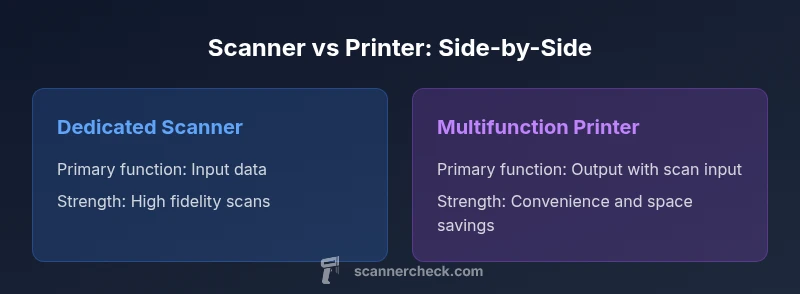
Dedicated scanners excel for high-fidelity input; multifunction printers offer convenience and space savings for mixed workflows
If your work emphasizes digitization and archival quality, a dedicated scanner is preferable. If you need both input and output in one unit and space or cost constraints matter, a capable MFP with scanning is the more practical choice.
Common Questions
What is the main difference between a scanner and a printer?
The main difference is input vs output. A scanner captures physical media and converts it into digital data for processing, storage, or OCR; a printer renders digital content onto paper. Each device is optimized for its primary role, influencing speed, quality, and maintenance.
A scanner is for digitizing information; a printer is for producing physical copies. Your choice should reflect whether you mostly digitize, print, or do both.
Can I replace a dedicated scanner with an all-in-one printer?
Yes, for light to moderate scanning tasks an all-in-one printer can suffice. For high-volume or archival-quality scanning, a dedicated scanner typically delivers better fidelity and speed.
You can, but expect trade-offs in speed and scan quality for heavy tasks.
Which is cheaper to operate over time: a separate scanner or a multifunction device?
Operating costs depend on volume and consumables. Multifunction devices may reduce desk clutter and consolidate ink, but per-page costs can be higher or lower depending on usage patterns.
It depends on how much you scan or print and the cost of ink or toner.
Do I need OCR software if I scan a document?
Many scanners and MFPs include built-in OCR, which makes scanned documents searchable and editable. Higher accuracy often comes from dedicated OCR software or cloud services.
OCR helps you search and edit scanned documents, usually built into devices or apps.
What should I consider when buying for home vs office?
Home setups benefit from compact, affordable devices with reliable software. Offices benefit from faster throughput, robust networking, and easy maintenance. Consider volume, reliability, and support when deciding.
Home needs portability and price; office needs speed and network reliability.
Key Takeaways
- Define your primary workflow before buying
- OCR capabilities significantly affect scan usability
- Balance upfront cost against ongoing consumables
- Standalone scanners vs MFPs suit different use cases
- Verify software compatibility and cloud integration